Why a Stage Layout Tool Matters More Than People Think
Eighty percent of avoidable on-site issues at Indian events trace back to the same root cause: the stage layout was never agreed in writing.
The decor team thinks the LED wall is 20 feet wide. The AV vendor brought a 16-foot-wide rig. The client expected a centre staircase. The fabricator built side ramps. By the time everyone is on site, you are 4 hours into rework you didn't budget for.
A stage layout tool fixes this with one move: a single, shareable, accurate plan that everyone can see and approve before load-in. That's it. The tool isn't magic. The discipline is.
What the EventSphereX Stage Layout Planner Does
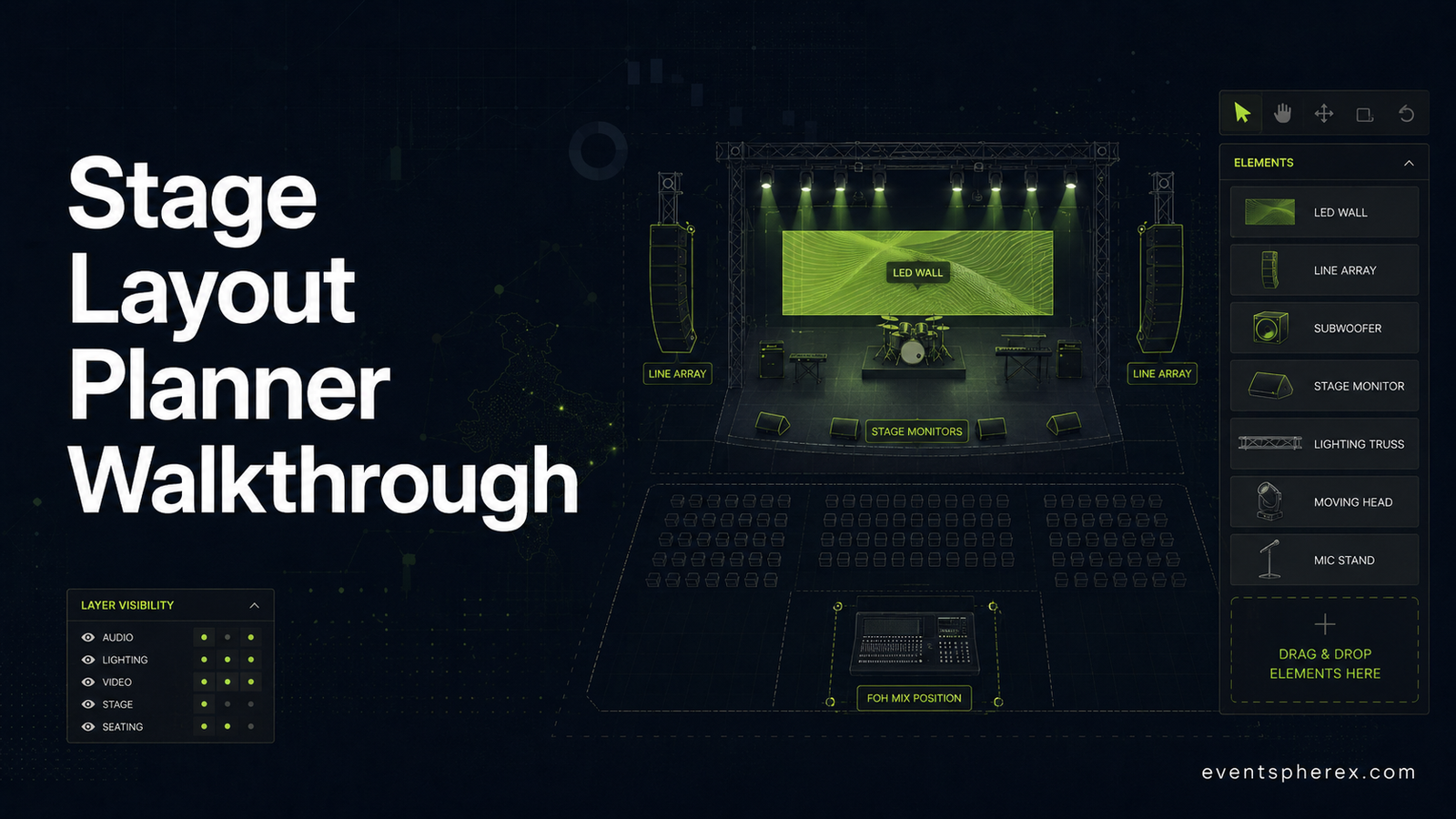
The free planner runs entirely in your browser - no install, no login required for the free tier. You can:
- Set your stage size (width x depth) to scale
- Drag and drop common stage elements: LED walls, line array speakers, monitors, lighting trusses, podiums, drum risers, video cameras
- Lay out the front-of-house: AOH (audience), aisles, FOH mixing position, camera platforms
- Add backstage and wing elements: green rooms, side stairs, side fills
- Save the layout as an image to share via WhatsApp, email, or in your tech rider
- Iterate fast - duplicate a layout, tweak for a different city, re-share
It is built specifically for Indian event production teams - the dimensions, equipment names and stage standards reflect what gets actually used on Indian corporate events, weddings, exhibitions and festivals.
A 10-Minute Walkthrough: Your First Stage Layout
Step 1 - Set the Stage Footprint (1 minute)
Open the Stage Layout Planner. Start by setting your stage dimensions. Standard Indian sizes:
- Small corporate / panel: 24 x 16 ft
- Mid-size corporate / awards: 32 x 20 ft
- Large conference / launch: 40 x 24 ft
- Wedding mandap stage: 20 x 20 ft (often square)
- Festival main stage: 60 x 40 ft and up
Type your numbers, hit set. The canvas re-scales.
Step 2 - Drop In the LED Wall (1 minute)
The LED wall is usually the visual anchor. Drag it onto the upstage line. Size it based on your content needs:
- 12 x 7 ft - 1080p-friendly for small corporate
- 20 x 11 ft - standard mid-size
- 32 x 18 ft - large keynote / launch
- 48 x 27 ft - festival / large-scale
Need to size by pixel pitch and viewing distance? Use the LED Pixel Calculator alongside this tool.
Step 3 - Place Line Array & Monitors (2 minutes)
Drag the L/R line arrays to the front corners of the stage, flown or stacked depending on your venue. Add front-fill speakers along the lip of the stage. Drop wedge monitors at the typical talent positions (centre podium, panel chairs, performance zones).
Rule of thumb for Indian corporate stages:
- 1 x wedge per panellist
- 2 x wedges flanking the central podium
- 1 x side fill per stage wing for performance segments
Step 4 - Add Lighting Trusses (1 minute)
Drop your front truss, mid truss and back truss along the stage depth. Mark fixture positions:
- Front truss: key light, follow spots
- Mid truss: top wash, gobos
- Back truss: backlight, eye candy (movers, beams)
- Side trees: cross light, audience wash
You don't need to map every fixture - what matters is that the truss positions don't clash with the LED wall, the camera lines, or the rigging points your venue actually has.
Step 5 - Lay Out Seating & FOH (2 minutes)
Drag in your audience block. For a typical Indian corporate audience:
- 2 ft per seat width, 3 ft row spacing
- Centre aisle for 200+ seats; double-aisle for 500+
- Camera platform at 8th-12th row, centre
- FOH mixing position at the back of the room, or just behind the camera platform
If you are doing rounds for a banquet/awards format, drop in the round table elements, allow 6 ft per round, and check sightlines to the LED wall.
Step 6 - Backstage & Wings (1 minute)
Add green rooms, side stairs, side fill positions. Mark talent entry routes. This is the layer most teams skip - and it's the one your stage manager and producer rely on most.
Step 7 - Save, Export, Share (1 minute)
Save your layout. Export as image. Drop into:
- The AV vendor brief
- The decor brief
- The client deck (annotate it - clients love a marked-up plan)
- The day-of run-of-show document
Now everyone is operating on the same plan. That's the win.
Five Real Use Cases Indian Event Teams Are Solving With This Tool
- Corporate keynote planner uses it to lock the LED wall, podium, and FOH positions before vendor briefs go out - eliminates the standard "we thought you wanted X" cycle.
- Wedding planner uses it to plan the mandap, sangeet stage, and reception layout for the same property - quickly shares three variants with the family before locking.
- Award show producer uses it to plan camera lines, runway exits, and audience sightlines two weeks before tech rehearsal.
- AV vendor uses it to validate a brief from a planner and quickly flag where their kit doesn't match the plan.
- Festival production team uses it to lay out the main stage, monitor world, and side wings before the technical site visit.
What's Free and What's Paid
The free tier of the Stage Layout Planner gives you 3 saved layouts per month - enough for most freelancers and small teams.
Paid tiers (Basic Rs 999/month, Pro Rs 2,499/month) unlock more saved layouts, more elements, and team-sharing features for agencies running multiple events in parallel. Full pricing on the tool page.
If you are running 3+ events a month, the paid tier pays for itself the first time you avoid a rework on site.
A Few Things the Tool Doesn't Do (Yet)
- Full 3D rendering - this is a 2D top-down planner, not a Unity/V-Ray scene
- Auto-rigging point calculations - you still need your AV/rigging vendor for structural sign-off
- Live multi-user collaboration - paid tier has team sharing, but not Google-Docs-style real-time edits
For most planning purposes, none of these block you from getting a clear, shareable layout 24 hours into the project - which is the actual point.
Closing Note
Stage layout problems are solved problems. The tools have existed for years; what was missing was a free, browser-based version built specifically for the Indian event production stack. That's what we set out to build with the EventSphereX Stage Layout Planner.
Try it on your next event. Send the layout to your AV vendor before the recce. Watch how many "we thought you wanted X" emails disappear.
Try the Stage Layout Planner free today - no signup needed for your first 3 layouts.