Why Free Tools Matter in Indian Event Planning
The Indian event industry runs on improvisation. A typical mid-size corporate event still gets planned across:
- A budget Excel that has 30+ tabs and one person who knows how it works
- A WhatsApp group with 40 unread messages
- A vendor list saved in someone's phone contacts
- A venue layout sketched on hotel notepad
- A checklist someone copied from a 2019 wedding deck
Every one of these is a category we built a free tool for. Not because the tools are revolutionary - they're not - but because purpose-built tools beat improvisation, especially when 5+ people on the same project need to see the same thing.
Below are the five we get the most planner feedback on.
1. Event Budget Calculator
Link: /tools/budget-calculator
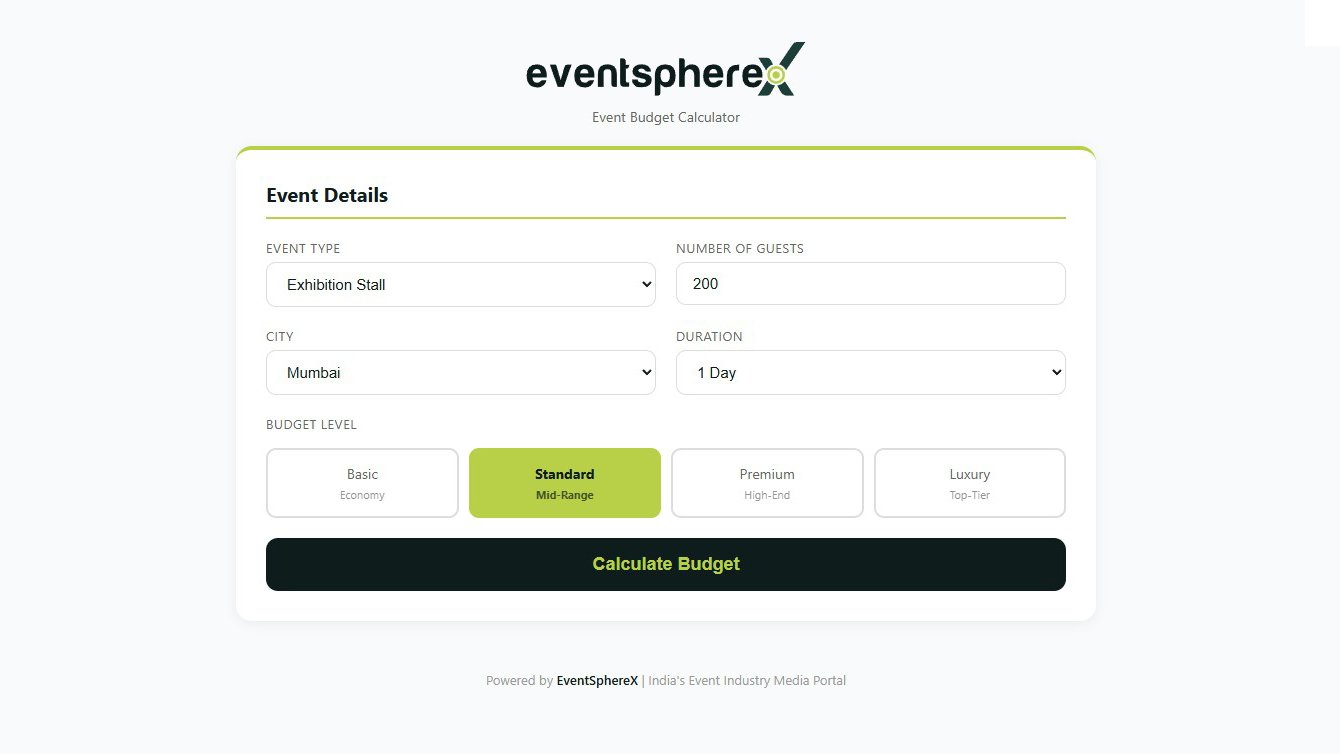
What it does: Builds a clean, line-itemed event budget across all standard Indian event cost categories - venue, AV, decor, catering, hospitality, talent, transport, contingency - with GST rates baked in.
When to use it:
- First quote to a client (in 30 minutes, not 3 hours)
- Budget review with the client before contract
- Vendor cost benchmarking
- Profitability check before accepting a brief
How planners use it:
- Wedding planners use it to give a quick three-tier estimate (basic / mid / premium) at the first family meeting
- Corporate event managers use it to defend pricing line-by-line during procurement reviews
- Freelance producers use it to bid on small events without having to build an Excel from scratch
Pro tip: Build templates for your most common event types (wedding sangeet, corporate AGM, product launch, awards night) and clone them per project.
2. Event Checklist Generator
Link: /tools/checklist-generator
What it does: Generates a complete, time-phased event planning checklist by event type - wedding, corporate, conference, product launch, exhibition booth - covering pre-event (T-90 days through T-1), event day, and post-event tasks.
When to use it:
- Project kickoff (give the team a baseline checklist immediately)
- Onboarding a new team member to a project
- Stress-testing your own plan ("did I miss anything?")
- Client transparency (share the checklist so they see the work behind the price)
How planners use it:
- Junior coordinators use it as their first event-planning teacher
- Senior producers use it as a final pre-event sanity check
- Agencies use it as part of the client deck - "here's what we'll deliver, on this timeline"
Pro tip: Filter to your specific event type, then add 5-10 client-specific items. The base list catches 80% of universals; you customise for the rest.
3. Event Calendar
Link: /tools/event-calendar
What it does: A live calendar of major Indian and global events - exhibitions, trade shows, conferences, festivals - searchable by category, city, and month. Helps you avoid date clashes, plan around major shows your client cares about, and find sponsorship opportunities.
When to use it:
- Picking event dates ("is there a major industry event the same week?")
- Planning sponsorship (which trade shows fit our brand?)
- Vendor booking (which dates are flooded across India? - venues and AV are scarce that week)
- Travel planning (which festivals are running near our event for added context?)
How planners use it:
- Corporate event leads check whether their date clashes with a major industry conference their target audience attends
- Wedding planners check if a major auspicious date is also a major event date - vendor availability collapses
- Brand activation teams find festivals to integrate sponsorships into
Pro tip: Bookmark your industry's annual conferences. Plan client events to either align with them (when sponsorship makes sense) or avoid them (when audience attention is split).
4. Industry Directory
Link: /tools/industry-directory
What it does: India's event-industry vendor directory - searchable by category (AV, decor, catering, photographers, anchors, fabrication, transport, talent, tech) and city. Free to list. Free to search.
When to use it:
- Sourcing a new vendor in a city you don't usually work in
- Finding backup options when a regular vendor is unavailable
- Onboarding a new team member to your trusted vendor list
- Discovering niche specialists (rare-instrument artists, multilingual MCs, sustainable decor, etc.)
How planners use it:
- Agencies based in Mumbai use it to find Hyderabad/Kochi vendors for outstation events without 4 hours of Google
- Freelance producers use it to fill a quick AV gap on short notice
- New planners use it to build a starter vendor network
Pro tip: When you find a great vendor, leave them a review. The directory's value compounds with planner-rated quality signals.
5. Stage Layout Planner
Link: /tools/stage-layout-planner
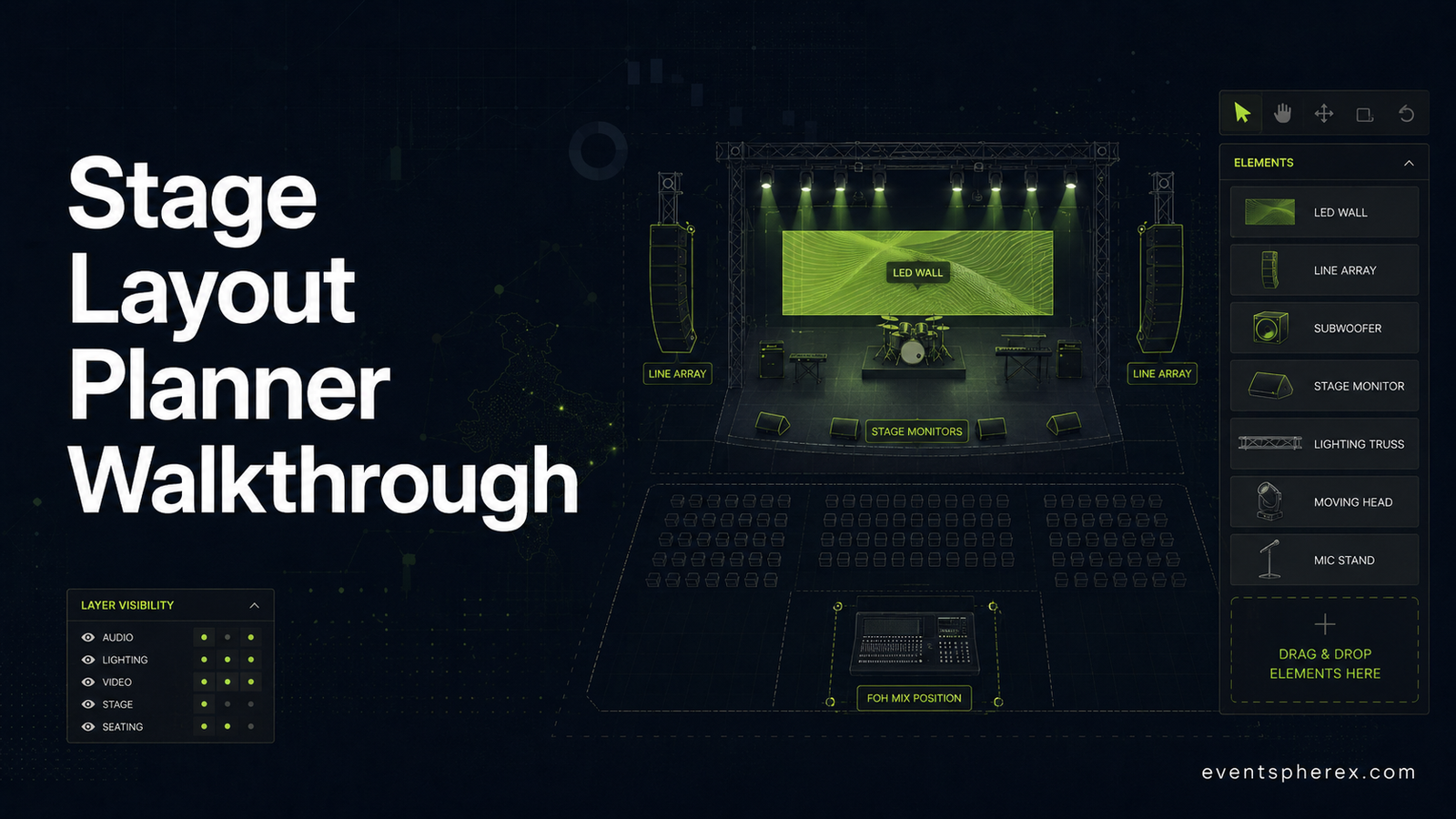
What it does: Drag-and-drop browser-based stage layout planner. Set stage dimensions, place LED walls, line array speakers, monitors, lighting trusses, podiums, audience seating, and backstage zones. Save and share with vendors and clients.
When to use it:
- Pre-recce planning (send AV and decor a layout before they walk the venue)
- Client approval (visual layout beats verbal description for sign-off)
- Vendor briefs (every vendor sees the same layout)
- Day-of run-of-show (annotate camera positions, FOH mixing, talent entries)
How planners use it:
- Corporate event leads lock the LED wall, podium, and FOH positions before vendor briefs go out
- Wedding planners share three mandap layout variants with the family in one meeting
- Award show producers plan camera lines and audience sightlines two weeks before tech rehearsal
Pro tip: Save your favourite layouts as templates and clone them for similar events. A "standard 1,500-pax corporate AGM layout" reused across 10 events saves 20+ hours.
Combining the Tools - How a Real Planner Uses All Five
Here's what a typical 5-week corporate event planning cycle looks like with the tools layered in:
Week 1 - Brief received.
- Open the Event Calendar to check date clashes.
- Open the Budget Calculator, build initial budget, share with client.
- Open the Checklist Generator, generate a baseline checklist.
Week 2 - Quote approved, kickoff.
- Use the Industry Directory to source vendors in the event city.
- Use the Stage Layout Planner to draft the venue layout.
- Share both with the client for approval.
Week 3-4 - Production planning.
- Refine Stage Layout based on vendor feedback.
- Update Budget Calculator with locked vendor quotes.
- Tick through Checklist Generator items in the team weekly.
Week 5 - On-site.
- Use the Stage Layout as the master document.
- Use the Checklist for on-site task ownership.
- Use the Budget Calculator to track actuals against quotes.
Total time saved across the cycle vs improvising in Excel and WhatsApp: routinely 6-10 hours, often more on bigger events.
What's Coming Next
We're actively building toward these tools in 2026:
- ROI Calculator - measure event ROI with multi-touch attribution
- Guest Manager - RSVP, registration, on-site check-in
- AI Booth Design Generator - exhibition booth concepts in minutes
If you'd like to be notified when each launches, drop your email on the EventSphereX homepage.
Closing Note
The Indian event industry is one of the most demanding services industries in the country, and one of the least supported by purpose-built tooling. Most planners are still building their workflow from scratch every event.
Five free tools won't fix everything. But they'll save you several hours per event, give your team a shared language, and let you focus on the parts of the work that actually need your judgement - the creative call, the client conversation, the on-site recovery - instead of the parts that don't.
Bookmark them. Use them. If they help, share them with your team and your peers. That's how the industry tooling improves over time - one planner, one event, at a time.
Try the tools:
All free. No signup needed for first use.